AI Hair Extension Simulator:Revolutionising the Hair Extensions Industry
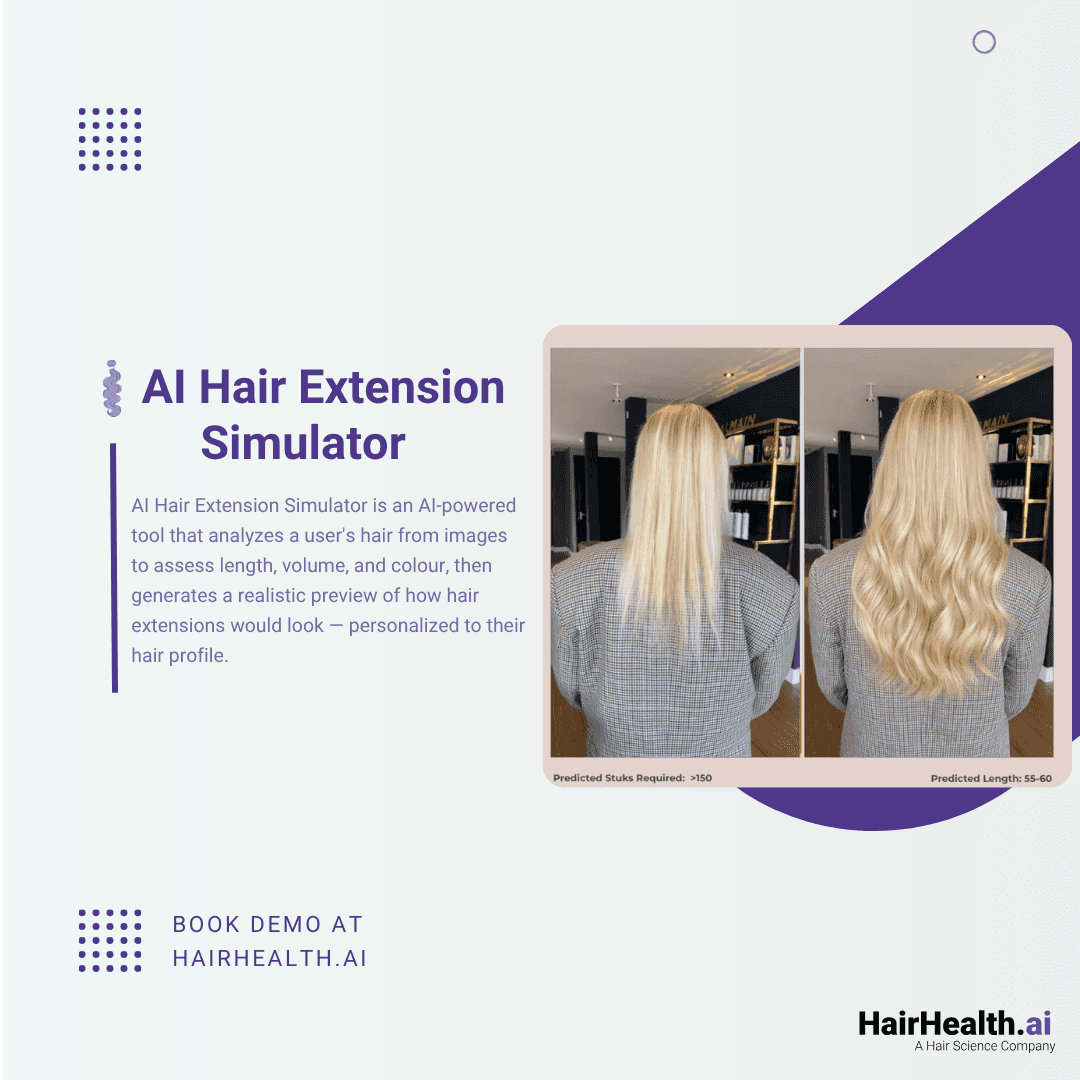
AI Hair extension simulators let customers see realistic before-and-after previews
The global hair extensions market is projected to surpass $5 billion by 2028, driven by growing demand for volume, length, and versatility. But the purchase journey for extensions remains one of the most friction-heavy experiences in beauty: customers struggle to visualise how extensions will look on their own hair, frequently choose the wrong colour shade, and are uncertain about how many pieces or what length they actually need.
The result? High return rates, low conversion on eCommerce platforms, and a heavy reliance on in-person salon consultations that limit scalability. AI-powered hair extension simulators are solving each of these problems by allowing customers to see a realistic, personalised preview of how extensions will look on them — before they spend a single euro.
What Is an AI Hair Extension Simulator?
An AI hair extension simulator is a computer vision tool that analyses a user’s uploaded photo and generates a realistic “after” image showing how they would look with hair extensions applied. Unlike basic filters or Photoshop mockups, an advanced simulator analyses the user’s existing hair characteristics — volume, length, density, texture, and head shape — to produce a natural-looking result that respects the physics of real hair.
The best systems go far beyond visual simulation. HairHealth.ai’s AI Hair Extension Simulator follows a six-step flow:
Step 1: User provides a back-view photo of their current hair
Step 2: User completes a questionnaire about their hair goals and lifestyle
Step 3: AI analyses current hair length, volume, and colour
Step 4: AI generates personalised recommendations for length, volume, and colour match
Step 5: A realistic visual simulation shows the after-extension look
Crucially, the colour prediction is matched to the brand’s specific SKU catalogue, meaning the simulation doesn’t just show “blonde extensions” — it recommends the exact product shade the customer should purchase. This closes the loop between inspiration and transaction.
The Business Case: Why Brands and Salons Need Virtual Try-On
For hair extension brands and eCommerce retailers, the conversion funnel has a well-known leak: customers browse, get excited, then abandon their cart because they cannot be sure the product will look right on them. Colour mismatch is the number one driver of extension returns across the industry.
Higher Conversion Rates
Virtual try-on removes the guesswork from online purchasing. When a customer can see themselves with a specific product applied, the psychological shift from “I’m interested” to “I’m buying” happens much faster. Brands deploying AI-powered try-on tools report significant increases in add-to-cart rates and time-on-site.
Reduced Returns via Colour Matching
Because the simulator matches the user’s hair colour to specific SKUs in the brand’s catalogue, the customer receives a product that has been algorithmically matched to their natural shade. This dramatically reduces the rate of “wrong colour” returns, which are costly to process and damaging to brand perception.
Competitive Differentiation
In a crowded market, offering an AI-powered consultation experience positions a brand as innovative and customer-centric. Beauty by Roos, the largest salon chain in the Netherlands, uses HairHealth.ai’s extension simulator to deliver this premium experience to their clients — both online and in-salon.
Extension Requirement Calculation
Beyond the visual simulation, the AI calculates practical details that customers need: how many extension pieces are required, what length they should choose, and what the estimated price will be. This replaces the back-and-forth of email consultations and accelerates the path to purchase.
How AI Extension Simulators Work: Under the Hood
The technology powering hair extension simulation is purpose-built and distinct from generic virtual try-on engines. A dedicated AI model, trained specifically on hair extension imagery, processes the user’s photo through several stages:
Hair segmentation: The AI isolates the user’s hair from the background and face, creating a precise mask that defines the boundary of where extensions will be applied
Characteristic analysis: The model evaluates current hair length, volume, density, and colour at a pixel level
Extension rendering: Using the analysed characteristics and the brand’s product catalogue, the AI renders extensions that blend naturally with the user’s existing hair in terms of colour, texture, and fall
SKU matching: A colour-matching algorithm compares the detected hair colour against the brand’s available shades and recommends the closest match
The model is trained on over 32,000 images and receives more than 1,100 new data points monthly, continuously improving accuracy and the range of hair types it handles well.
For Salons and Stylists: Elevating the Consultation Experience
For salons offering extension services, the simulator transforms the consultation process. Rather than holding swatches up to a client’s hair and asking them to imagine the result, a stylist can show them a realistic preview on their phone or tablet in seconds.
This serves multiple purposes: it sets realistic expectations (reducing dissatisfaction), it upsells length and volume options (the client can see the difference between 16-inch and 22-inch extensions on their own face), and it builds excitement that leads to immediate booking.
The technology also reduces the expertise barrier for newer stylists. With AI handling the colour matching and length recommendation, even a junior team member can deliver a confident, data-backed consultation.
Integration and Deployment
HairHealth.ai’s AI Hair Extension Simulator is designed for seamless integration into existing brand ecosystems:
Web embed: Place the simulator directly on your eCommerce product pages or a dedicated landing page
API access: Integrate the simulation engine into your own app or platform
Brand customisation: White-label the entire experience with your logo, colours, messaging, and product catalogue
Data integration: Connect results to your CRM, Zapier, or Airtable workflows for follow-up and remarketing
Setup involves onboarding the brand’s SKU catalogue (including shade images and product metadata) so that the simulator recommends from the actual available inventory.